
Never lose a chat to a
full context window

A tray widget that shows how full every Claude Code chat is and hands one off to a fresh session in a new terminal before it runs out of room..

no sign-in · no API key · no network calls

See the ceiling coming

Every chat you have touched in the last 24 hours, with a bar showing how much of its context window is gone. The bar turns amber, orange and red as it fills — and the tray tooltip reports the fullest chat, not the most recent one, because the chat in trouble is rarely the one in front of you.

Read from your own transcripts, so the number is the real one not an estimate.
Move the work, not just the files

One click asks the chat to summarise itself, saves that summary, opens a fresh session in a new terminal in the same folder, and stops the old one. The new session starts already knowing what the old one knew.

The summary is written by the chat itself not scraped from the transcript by this app.

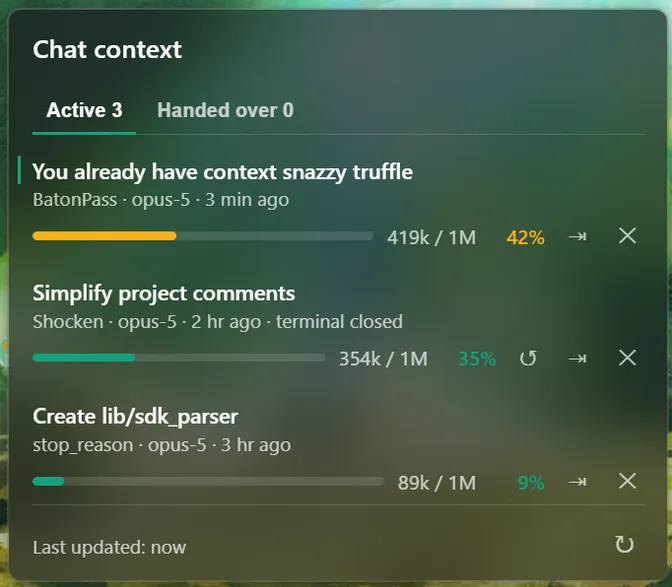
The BatonPass widget listing three active chats, each with a context bar showing how full it is. One is marked 'terminal closed' and offers a button to reopen it.

The bar is the whole interface. Tokens used, the model's real window, and the percentage between them.

Colour warns proportionally. Amber at 40%, orange at 60%, red at 80%, of that model's window, so a 200k model warns earlier in absolute terms.

Closed a terminal by accident? Chats with no process left show terminal closed and grow a button that reopens them where they were.

How a handoff works

Every step that can
fail runs first

A handoff touches real things: it opens windows and stops processes. So the order is the design. Nothing irreversible happens until everything that could go wrong already has.

A summary that comes back empty writes no file and kills nothing. A terminal that won't open leaves the summary on disk and leaves the old chat running and clicking again retries just that step, without paying for the summary twice.

  1. 01 summarise the chat writes its own handoff
  2. 02 validate too short? nothing happens
  3. 03 save written to ~/.claude/handoffs
  4. 04 launch new terminal, same folder
  5. 05 mark the handover is recorded
  6. 06 kill the old chat stops

Local by design

Nothing leaves your machine

BatonPass reads the session transcripts Claude Code already writes to ~/.claude. There is no sign-in, no API key, and no networking code in the app.

Download

Get BatonPass

Free and open source. Needs the Claude Code CLI already installed — BatonPass reads what it writes and launches it for you.

On an Apple Silicon Mac, take the arm64 dmg — the x64 one installs fine and then runs under Rosetta. Neither build is signed with a paid developer certificate, so the first launch is blocked: on macOS, allow it from System Settings → Privacy & Security → Open Anyway; on Windows, More info → Run anyway.